Game Example
Digital Slot Machine
This project demonstrates how to build a simple digital slot machine in Visual Basic 6.
It is a fun example for learning random number generation, event-driven programming,
visual feedback, and basic game logic.
Introduction
A slot machine is a small but effective programming exercise because it combines several useful ideas in one project.
The program generates random digits, updates the interface instantly, checks for a winning condition, and gives feedback to the user.
The slot machine uses labels to display digits, buttons to trigger actions,
an image control to show a winning message, and an MMControl component to play a sound effect.
How the Slot Machine Works
Random Number Generation
Each slot uses Int(Rnd * 10) to generate a random digit from 0 to 9.
Winning Rule
In this version, a win occurs whenever at least one digit is 7. You can later upgrade this to require double or triple sevens.
Visual Feedback
The interface updates the slot values immediately and displays a winner image when the player wins.
Sound Support
The Visual Basic 6 version uses MMControl to play applause or other sound effects when the result is a win.
Live Slot Machine Simulation
Try clicking the Spin button to test the slot machine.
Digital Slot Machine
Press SPIN to play.
Score Tracker Simulation
We added a simple scoring system so that users can see how many times they have played and how many winning spins they achieved.
Challenge: Try upgrading the game so that:
- 1 seven = small prize
- 2 sevens = medium prize
- 3 sevens = jackpot
The Interface
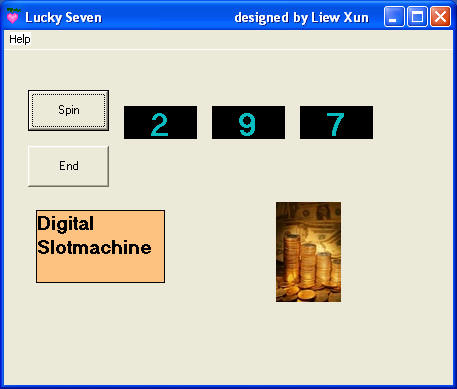
Visual Basic 6 Code Example
Private Sub Command1_Click()
MMControl1.Command = "Close"
Picture1.Visible = False
Label1.Caption = Int(Rnd * 10)
Label2.Caption = Int(Rnd * 10)
Label3.Caption = Int(Rnd * 10)
If (Label1.Caption = 7) Or (Label2.Caption = 7) Or (Label3.Caption = 7) Then
Picture1.Visible = True
MMControl1.Notify = False
MMControl1.Wait = True
MMControl1.Shareable = False
MMControl1.DeviceType = "WaveAudio"
MMControl1.FileName = "D:\Liew Folder\VB program\audio\applause.wav"
MMControl1.Command = "Open"
MMControl1.Command = "Play"
End If
End Sub
Private Sub Command2_Click()
End
End Sub
Private Sub Form_Click()
Label5.Visible = False
End Sub
Private Sub help_Click()
Label5.Visible = True
End Sub
The code above shows the basic game logic. The three labels receive random numbers, and the program checks whether any of the digits equals 7.
If so, the winning image becomes visible and the applause sound is played.
Key Components
Labels
Three labels are used to display the generated slot values.
Buttons
Buttons are used to spin the slots and reset the game state.
Image Control
A winner image is displayed when the game detects a successful spin.
MMControl
The multimedia control handles the playback of applause or other sound effects.
Equivalent VB.NET Code
The following example shows how the same digital slot machine idea can be implemented in VB.NET
using Windows Forms. This version uses labels to display the slot values, buttons to spin and reset
the game, and a picture box to show the winning image.
Public Class Form1
Dim rand As New Random()
Dim spinCount As Integer = 0
Dim winCount As Integer = 0
Private Sub btnSpin_Click(sender As Object, e As EventArgs) Handles btnSpin.Click
Dim n1 As Integer
Dim n2 As Integer
Dim n3 As Integer
Dim hasWin As Boolean = False
n1 = rand.Next(0, 10)
n2 = rand.Next(0, 10)
n3 = rand.Next(0, 10)
lblDigit1.Text = n1.ToString()
lblDigit2.Text = n2.ToString()
lblDigit3.Text = n3.ToString()
spinCount += 1
If n1 = 7 Or n2 = 7 Or n3 = 7 Then
hasWin = True
winCount += 1
picWinner.Visible = True
lblResult.Text = "Congratulations! You win!"
MessageBox.Show("You win!", "Digital Slot Machine")
Else
picWinner.Visible = False
lblResult.Text = "No 7 this time. Try again!"
End If
lblSpinCount.Text = spinCount.ToString()
lblWinCount.Text = winCount.ToString()
If spinCount > 0 Then
lblWinRate.Text = Math.Round((winCount / spinCount) * 100, 0).ToString() & "%"
End If
End Sub
Private Sub btnReset_Click(sender As Object, e As EventArgs) Handles btnReset.Click
lblDigit1.Text = "0"
lblDigit2.Text = "0"
lblDigit3.Text = "0"
spinCount = 0
winCount = 0
lblSpinCount.Text = "0"
lblWinCount.Text = "0"
lblWinRate.Text = "0%"
lblResult.Text = "Press SPIN to play."
picWinner.Visible = False
End Sub
Private Sub Form1_Load(sender As Object, e As EventArgs) Handles MyBase.Load
lblDigit1.Text = "0"
lblDigit2.Text = "0"
lblDigit3.Text = "0"
lblResult.Text = "Press SPIN to play."
lblSpinCount.Text = "0"
lblWinCount.Text = "0"
lblWinRate.Text = "0%"
picWinner.Visible = False
End Sub
End Class
Possible Improvements
- Add a jackpot rule that requires all three digits to be 7.
- Introduce credits, prizes, and difficulty levels.
- Add faster reel-style animation instead of a single bounce effect.
- Display different messages for small wins and big wins.
- Store the player’s score and best record in a file or database.
Programming Tip: Small game projects like this are excellent for mastering randomization, control handling, conditional logic, and user feedback.