
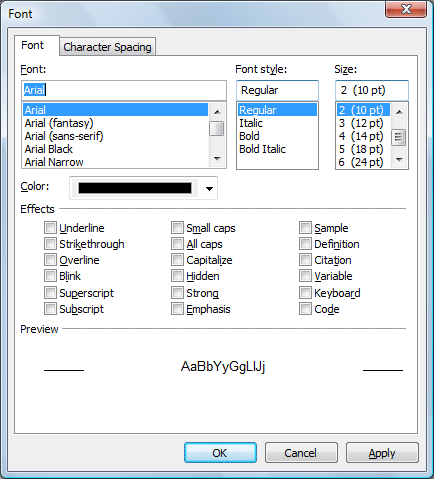
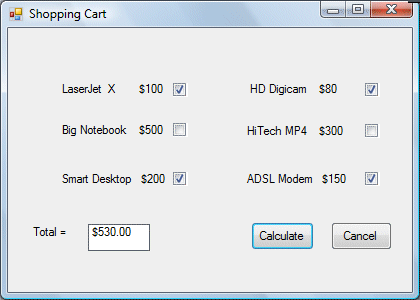
A Checkbox allows the user to select one or more items by checking the checkbox/check boxes concerned. For example, in the Font dialog box of any Microsoft Text editor like MS Words(as shown in Figure 17.1), there are many checkboxes under the Effects section such as that shown in the figure below. The user can choose to underline, subscript, small caps, superscript, blink and more. In Visual Basic 2010, you may create a shopping cart.
In this example, the user can click on the heckboxes on the shopping cart that correspond to the items they wish to purchase, and the total payment can be computed at the same time.
Private Sub BtnCalculate_Click(ByVal sender As System.Object, ByVal e As System.EventArgs) Handles BtnCalculate.Click
Const LX As Integer = 100
Const BN As Integer = 500
Const SD As Integer = 200
Const HD As Integer = 80
Const HM As Integer = 300
Const AM As Integer = 150
Dim sum As Integer

If CheckBox1.Checked = True Then
 sum += LX
End If

If CheckBox2.Checked = True Then
 sum += BN
End If

If CheckBox3.Checked = True Then
 sum += SD
End If

If CheckBox4.Checked = True Then
 sum += HD
End If

If CheckBox5.Checked = True Then
 sum += HM
End If

If CheckBox6.Checked = True Then
 sum += AM
End If
 Label5.Text = sum.ToString("c")
The shopping cart is shown in Figure 17.1
Here is another example
Private Sub Button1_Click(ByVal sender As System.Object, ByVal e As System.EventArgs) Handles Button1.Click
Const large As Integer = 10.0
Const medium As Integer = 8
Const small As Integer = 5
Dim sum As Integer

If CheckBox1.Checked = True Then
 sum += large
End If

If CheckBox2.Checked = True Then
 sum += medium
End If

If CheckBox3.Checked = True Then
 sum += small
End If
 Label5.Text = sum.ToString("c")
The output is shown in Figure 17.2
In this example, the user can enter text into a text box and format the font using the three check boxes that represent bold, italic and underline.
The code
Private Sub CheckBox1_CheckedChanged(ByVal sender As System.Object, ByVal e As System.EventArgs) Handles CheckBox1.CheckedChanged
If CheckBox1.Checked Then
 TextBox1.Font = New Font(TextBox1.Font, TextBox1.Font.Style Or FontStyle.Bold)
Else
 TextBox1.Font = New Font(TextBox1.Font, TextBox1.Font.Style And Not FontStyle.Bold)
End If
End Sub

Private Sub CheckBox2_CheckedChanged(ByVal sender As System.Object, ByVal e As System.EventArgs) Handles CheckBox2.CheckedChanged
If CheckBox2.Checked Then
 TextBox1.Font = New Font(TextBox1.Font, TextBox1.Font.Style Or FontStyle.Italic)
Else
 TextBox1.Font = New Font(TextBox1.Font, TextBox1.Font.Style And Not FontStyle.Italic)
End If
End Sub

Private Sub CheckBox3_CheckedChanged(ByVal sender As System.Object, ByVal e As System.EventArgs) Handles CheckBox3.CheckedChanged
If CheckBox2.Checked Then
 TextBox1.Font = New Font(TextBox1.Font, TextBox1.Font.Style Or FontStyle.Underline)
Else
 TextBox1.Font = New Font(TextBox1.Font, TextBox1.Font.Style And Not FontStyle.Underline)
End If
End Sub
The output

* The above program uses the CheckedChanged event to respond to the user selection by checking a particular checkbox, it is similar to the click event. The statement
TextBox1.Font = New Font(TextBox1.Font, TextBox1.Font.Style Or FontStyle.Italic)
will retain the original font type but change it to italic font style.
TextBox1.Font = New Font(TextBox1.Font, TextBox1.Font.Style And Not FontStyle.Italic)
will also retain the original font type but change it to regular font style. (The other statements employ the same logic)
Copyright©2008 Dr.Liew Voon Kiong. All rights reserved |Contact|Privacy Policy
