Introduction in Visual Basic 2022
Lesson 1 covers introduction using the same proven VBTutor lesson layout, now adapted for Visual Basic 2022 and Visual Studio 2022.
Lesson Overview
Key Takeaway
This lesson focuses on introduction in Visual Basic 2022.
Key Takeaway: Visual Basic 2022 is the latest evolution of Microsoft's VB.NET language, part of the Visual Studio 2022 ecosystem. This tutorial will guide you through installing VS2022 and creating your first application.
1.1 What is Visual Basic 2022?
Microsoft released Visual Studio 2022 in early 2022, providing support for coding in multiple programming languages across various platforms. Visual Basic 2022 is the latest version of the VB.NET programming language. Alongside VB, Visual Studio 2022 supports:
- C#
- C++
- F#
- JavaScript
- Java
- Python
AI-Powered Development
Visual Studio 2022 integrates GitHub Copilot, an AI pair programmer that suggests code in real-time as you type.
Intelligent Code Completion
Copilot understands context and provides whole-line or function suggestions based on your coding patterns.
Key AI features in VS2022:
- GitHub Copilot: AI pair programmer that suggests code as you type
- IntelliCode: Context-aware code completions powered by AI
- AI-Assisted Refactoring: Smart suggestions for code improvements
- Natural Language to Code: Convert comments into working code
Download the free Community Edition:
1.2 Visual Studio 2022 Start Page
The VS2022 interface features a modernized start page with these key options:
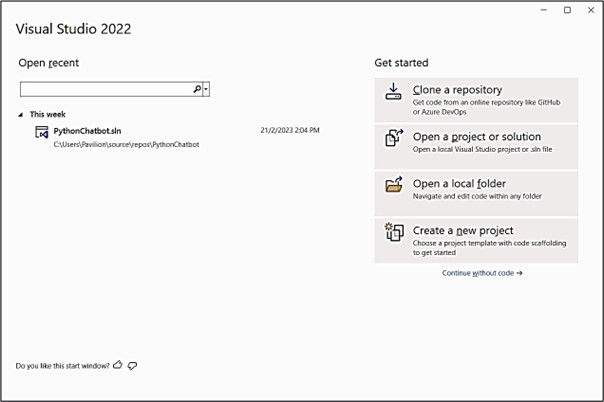
Select "Create a new project" to access the template selection screen:
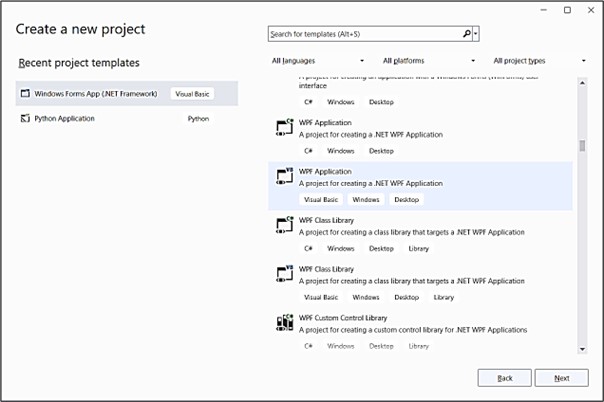
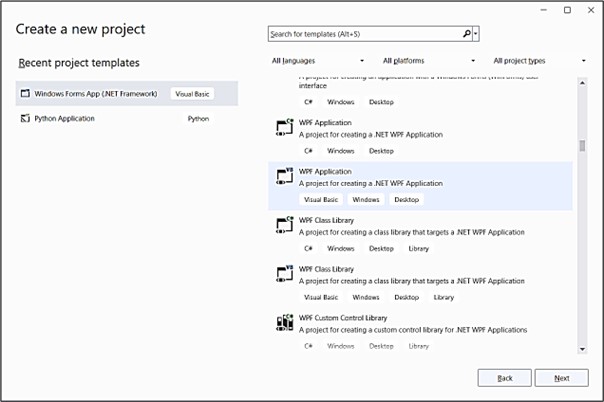
Scroll through available templates and select "WPF Application" for desktop development:
Configure your project with these settings:
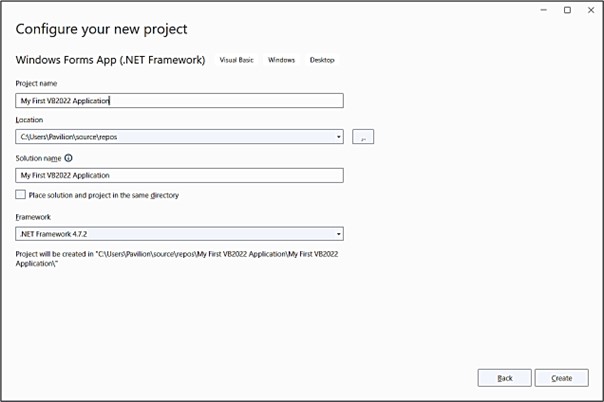
1.3 Visual Basic 2022 IDE Overview
After clicking "Create", you'll see the VB2022 development environment:
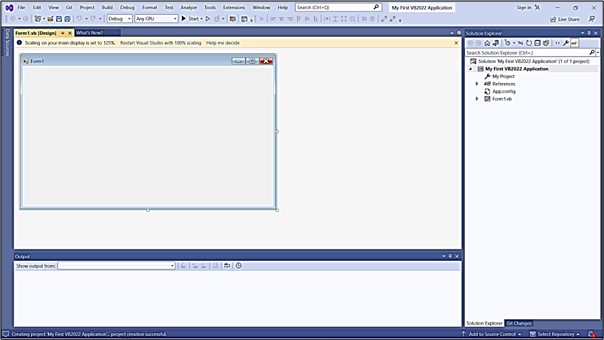
Key Components of the IDE:
- Solution Explorer - Manage project files and resources
- Properties Window - Configure component properties
- Design Surface - Visual form designer
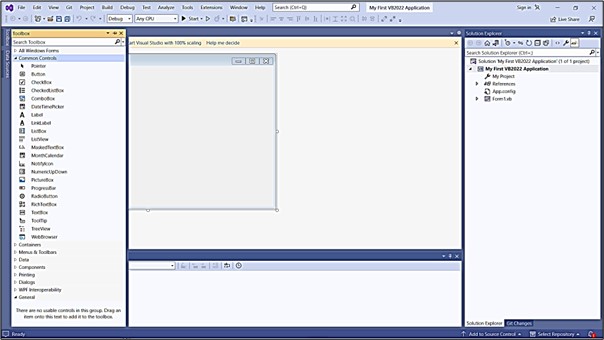
- Toolbox - UI controls (Ctrl+Alt+X to toggle)
Access controls using the Toolbox tab (Ctrl+Alt+X):
Creating Your First VB2022 Application
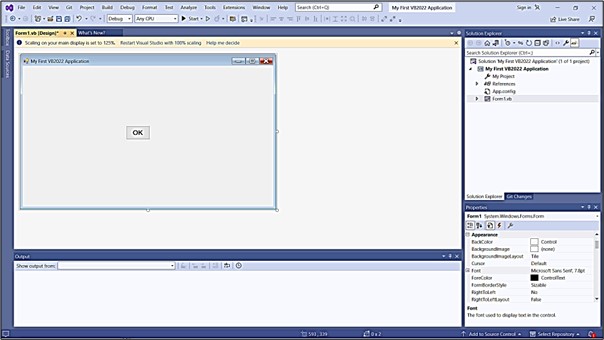
Step-by-Step Guide:
- Change form title to "My First VB 2022 Application" in Properties window
- Drag a Button control from Toolbox to the form
- Change button text to "OK" in Properties window
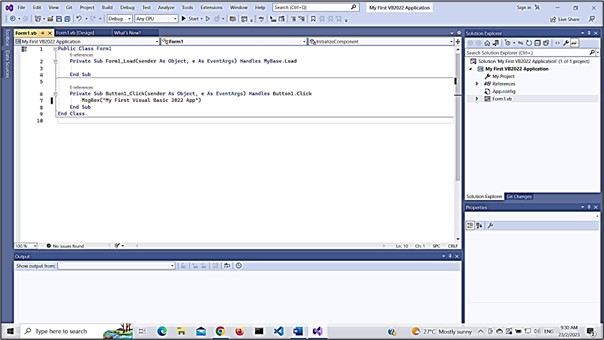
Double-click the button to access the code editor and add this code:
Run the program (F5) and click the button to see:
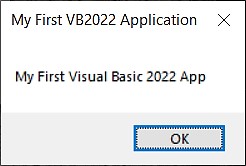
Understanding the Code: The MsgBox function displays text in a dialog box. This simple example demonstrates event handling - the code executes when the button is clicked.
Congratulations! You've created your first VB2022 application. In upcoming lessons, we'll explore:
- Advanced UI design techniques
- Data types and variables
- Control structures
- Database connectivity
- And much more!
Lesson Recap
Lesson Summary
In this introductory lesson, we've covered the fundamentals of getting started with Visual Basic 2022.
Visual Basic 2022 Overview
Visual Basic 2022 is part of Microsoft’s modern Visual Studio ecosystem for building Windows applications.
Installation
You learned how to install the free Visual Studio Community Edition and prepare the development environment.
IDE Navigation
You explored key parts of the IDE, including Solution Explorer, the Properties Window, and the Toolbox.
First Application
You created your first VB2022 Windows Forms application with form design and event handling.
Core Concepts
You learned basic UI design and simple programming logic using controls and the MessageBox function.
You’ve successfully installed Visual Studio 2022, created your first VB2022 project, designed a simple user interface, and implemented basic functionality. This foundation prepares you for more advanced topics in the following lessons.
Next Lesson
Ready to build your next Visual Basic 2022 application?
Lesson 2: Creating Your First VB2022 ApplicationNext Lesson
Ready to learn how to the user interface? Continue to Lesson 2: Designing the UI.
Related Resources
Featured Books
Enhance your learning with these comprehensive Visual Basic guides used by universities worldwide:

Visual Basic 2022 Made Easy
The ultimate beginner-friendly guide for mastering Windows-based application development using Visual Basic in Visual Studio 2022.
What You'll Learn:
- Master the Core Concepts of Visual Basic 2022: Gain a solid understanding of essential programming concepts such as variables, data types, control structures, procedures, and error handling—all explained in a beginner-friendly manner.
- Build Real Windows Forms Applications Step by Step: Learn how to design and develop functional Windows desktop applications using VB.NET and Windows Forms, complete with user interface controls, menus, and event handling.

Visual Basic 2026 Made Easy
Upgrade to modern Visual Basic with VB.NET, .NET 10, and Visual Studio 2026. Build real-world applications with modern tools and AI-powered development.
What You'll Learn:
- Modern VB.NET development
- Hands-on projects and real apps
- GitHub Copilot and AI integration

Visual Basic 2026 Programming
Take your VB.NET skills to the next level. Learn advanced programming techniques, real-world architectures, and professional development practices using modern .NET.
What You'll Learn:
- Best after VB2022 or VB.NET fundamentals
- For intermediate and advanced learners
- Ideal for building real-world systems
Lesson Recap
Lesson Summary
You have completed Lesson 1: Introduction.
Core concept
You studied introduction in VB2022.
Practical focus
The lesson follows the same classic VBTutor learning path and structure.
Modern tools
Examples are positioned around Visual Studio 2022 and VB.NET workflows.
Next step
Continue to Lesson 2 to keep progressing through the course.
Continue with the next lesson to build your VB2022 skills step by step.
Next Lesson
Ready to continue?
Lesson 2: Designing the UIRelated Resources