Mastering Arrays in Visual Basic 6
Learn how to efficiently manage collections of data with arrays in VB6
Lesson Overview
Key Takeaway
Arrays in VB6 allow you to efficiently store and manipulate collections of related data using a single variable name and index numbers.
Welcome to Lesson 16 of our Visual Basic 6 Tutorial! In this lesson, you'll master VB6's powerful array features that allow you to efficiently manage collections of related data. Arrays are essential for handling lists of items, tables of information, and any situation where you need to work with multiple values of the same type.
16.1 Introduction to Arrays
An array is a powerful tool in programming, allowing us to represent multiple items with a single variable. Instead of dealing with individual items, we can use an array to handle a list of similar items efficiently.
Without Arrays
- Declaring 100 separate variables for 100 names
- Complex code with excessive If...Then statements
- Time-consuming and inefficient
- Hard to maintain and scale
With Arrays
- Single array variable for all names
- Access items via index (name(1), name(2), etc.)
- Simplified code using loops
- Easier to maintain and scale
Consider the scenario where we need to enter one hundred names. It would be impractical and time-consuming to declare 100 different variables for each name. Moreover, if we intend to process this data and make decisions based on it, we would end up with an excessive number of if...then statements, leading to a waste of time and effort.
16.2 Dimensions of an Array
Arrays in VB6 can have one or more dimensions, allowing you to represent various data structures:
One-Dimensional Arrays
Like a list of items or a table that consists of one row or one column of items.
Two-Dimensional Arrays
A table of items that make up rows and columns.
| Year | 7 | 8 | 9 |
|---|---|---|---|
| Football | StuGames(1,7) | StuGames(1,8) | StuGames(1,9) |
| Basketball | StuGames(2,7) | StuGames(2,8) | StuGames(2,9) |
16.3 Declaring Arrays
We can use Public or Dim statement to declare an array just as the way we declare a single variable. The Public statement declares an array that can be used throughout an application while the Dim statement declares an array that could be used only in a local procedure.
16.3.1 Declaring One-Dimensional Arrays
The general syntax to declare a one-dimensional array:
Where subscript indicates the last index in the array. Note that by default, arrays in VB6 start at index 0.
' Declare an array with 11 elements (indexes 0 to 10)
Dim CusName(10) As String

' Use Option Base 1 to start arrays at index 1
Option Base 1
Dim CusName(10) As String ' 10 elements (1 to 10)

' Specify explicit bounds
Dim Count(100 To 500) As Integer
Example 16.3: Student Names
This program accepts student names through an input box and displays them in a list box.
Dim studentName(1 To 10) As String
Dim num As Integer

Private Sub addName()
    For num = 1 To 10
        studentName(num) = InputBox("Enter the student name")
        If studentName(num) <> "" Then
            List1.AddItem studentName(num)
        Else
            End
        End If
    Next
End Sub

Private Sub Start_Click()
    addName
End Sub
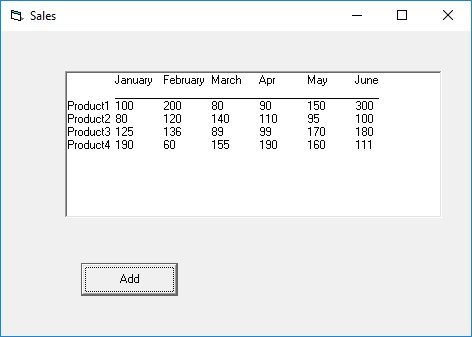
Figure 16.1: Student names interface
16.3.2 Declaring Two-Dimensional Arrays
Two-dimensional arrays are perfect for representing tabular data with rows and columns.
Example 16.5: Student Games
This example tracks student participation in games across different year levels.
' 4 games, 6 year levels (7 to 12)
Dim StuGames(1 To 4, 7 To 12) As Integer
| Year | 7 | 8 | 9 | 10 | 11 | 12 |
|---|---|---|---|---|---|---|
| Football | StuGames(1,7) | StuGames(1,8) | StuGames(1,9) | StuGames(1,10) | StuGames(1,11) | StuGames(1,12) |
| Basketball | StuGames(2,7) | StuGames(2,8) | StuGames(2,9) | StuGames(2,10) | StuGames(2,11) | StuGames(2,12) |
| Tennis | StuGames(3,7) | StuGames(3,8) | StuGames(3,9) | StuGames(3,10) | StuGames(3,11) | StuGames(3,12) |
| Hockey | StuGames(4,7) | StuGames(4,8) | StuGames(4,9) | StuGames(4,10) | StuGames(4,11) | StuGames(4,12) |
Example 16.6: Sales Volume
This program summarizes sales volume for four products over six months.
Private Sub cmdAdd_Click()
    Dim prod, mth As Integer ' prod is product and mth is month
    Dim saleVol(1 To 4, 1 To 6) As Integer
    Const j = 1

    listVolume.AddItem vbTab & "January" & vbTab & "February" & vbTab & "March" _
        & vbTab & "Apr" & vbTab & "May" & vbTab & "June"
    listVolume.AddItem vbTab & "____________________________________________"

    For prod = 1 To 4
        For mth = 1 To 6
            saleVol(prod, mth) = InputBox("Enter the sale volume for product " & prod & " month " & mth)
        Next mth
    Next prod

    For i = 1 To 4
        listVolume.AddItem "Product" & i & vbTab & saleVol(i, j) & vbTab & saleVol(i, j + 1) & vbTab _
            & saleVol(i, j + 2) & vbTab & saleVol(i, j + 3) & vbTab & saleVol(i, j + 4) & vbTab & saleVol(i, j + 5)
    Next i
End Sub
Figure 16.2: Sales volume output
16.4 Dynamic Arrays
Dynamic arrays allow you to resize arrays during runtime when the number of elements is unknown at design time.
Static Arrays
- Fixed size determined at design time
- Size cannot be changed at runtime
- Simple but inflexible
- Syntax:
Dim arr(10) As Integer
Dynamic Arrays
- Size can be set/reset at runtime
- Flexible for varying data sizes
- Use ReDim to resize
- Syntax:
Dim arr() As Integer
Example 16.7: Dynamic Squares
This program demonstrates dynamic arrays by calculating squares of numbers.
Private Sub cmd_display_Click()
    Dim myArray() As Integer
    Dim i, n As Integer
    n = InputBox("Enter the upper bound of array")
    List1.Clear

    ReDim myArray(n) ' Resize the array

    For i = 1 To n
        myArray(i) = i ^ 2
        List1.AddItem myArray(i)
    Next
End Sub
Dynamic Array Output:
Lesson Summary
In this lesson, you've mastered VB6's essential array techniques:
Array Fundamentals
Understanding what arrays are and why they're useful
Dimensions
Working with one-dimensional and multi-dimensional arrays
Declaration
Properly declaring arrays with explicit bounds
Dynamic Arrays
Creating flexible arrays that resize at runtime
Best Practice
Use dynamic arrays with the ReDim Preserve statement when you need to preserve existing values while resizing. Remember that ReDim alone will erase existing values in the array.
Practice Exercises
Test your understanding of VB6 arrays with these exercises:
Exercise 1: Temperature Records
Create an array to store daily temperatures for a month and calculate the average.
Exercise 2: Student Grades
Use a two-dimensional array to store student grades for multiple subjects.
Exercise 3: Dynamic Inventory
Create a program that allows users to add items to a dynamic array.
Exercise 4: Array Sorting
Implement a bubble sort algorithm to sort an array of numbers.
Exercise 5: Matrix Operations
Create functions to add and multiply two-dimensional arrays (matrices).
Next Lesson
Continue your VB6 journey with Lesson 17: Creating Files in VB6.
Related Resources

Visual Basic 6 Made Easy
Start your programming journey with Visual Basic 6. Learn how to build Windows applications step-by-step using an easy and beginner-friendly approach.
- Perfect for beginners
- Learn core programming concepts
- Build real VB6 applications

Visual Basic 2026 Made Easy
Upgrade to modern Visual Basic with VB.NET, .NET 10, and Visual Studio 2026. Build real-world applications with modern tools and AI-powered development.
- Modern VB.NET development
- Hands-on projects and real apps
- GitHub Copilot & AI integration
🚀 Ready for the Next Level?
After learning the basics with VB6 Made Easy and upgrading to VB2026 Made Easy, continue your journey into advanced professional development.

Advanced VB.NET Programming
Take your VB.NET skills to the next level. Learn advanced programming techniques, real-world architectures, and professional development practices using modern .NET.
Best For:
- After VB6 or VB.NET fundamentals
- Intermediate to advanced learners
- Developers building real-world systems
🚀 Migrating from VB6 to VB.NET
Still using or learning classic Visual Basic 6? This practical step-by-step guide shows you how to migrate legacy VB6 applications to modern VB.NET with Visual Studio 2026 and .NET 10.

VB6 to Modern VB.NET Made Easy
A practical step-by-step guide to migrating legacy Visual Basic 6 applications to VB.NET with Visual Studio 2026 and .NET 10.
- Designed for VB6 programmers and legacy app maintainers
- Clear migration guidance from classic VB to modern .NET
- Perfect bridge between VB6 fundamentals and VB.NET development
🚀 Move to Modern VB.NET
Visual Basic 6 is your foundation — but modern development uses VB.NET with .NET and Visual Studio 2026.
Start VB.NET Tutorial →