Mastering String Functions in VB6
Learn essential string manipulation functions for text processing and data handling
Lesson Overview
Key Takeaway
String functions in VB6 provide powerful tools for text manipulation, enabling you to extract, transform, and analyze textual data efficiently.
Welcome to Lesson 13 of our Visual Basic 6 Tutorial! In this lesson, you'll master VB6's essential string manipulation functions. These functions are crucial for creating applications that process and analyze textual data effectively.
13.1 The Len Function
The Len function returns an integer representing the length of a string, including spaces.
Syntax
13.2 The Right Function
The Right function extracts a specified number of characters from the end of a string.
Syntax
13.3 The Left Function
The Left function extracts a specified number of characters from the beginning of a string.
Syntax
13.4 The LTrim, RTrim and Trim Functions
These functions remove whitespace from strings:
1 LTrim
Removes leading whitespace from a string.
2 RTrim
Removes trailing whitespace from a string.
3 Trim
Removes both leading and trailing whitespace.
13.5 The Mid Function
The Mid function extracts a substring from a string starting at a specified position.
Syntax
13.6 The InStr Function
The InStr function returns the position of the first occurrence of a substring within a string.
Private Sub Form_Activate()
    Print InStr(1, "Visual Basic", "Basic")
End Sub
InStr Function Output:
13.7 The Str and Val Functions
The Str function converts a number to a string, while Val converts a string to a number.
1 Str Function
Converts numbers to strings
2 Val Function
Converts strings to numbers
13.8 The UCase and LCase Functions
These functions convert strings to uppercase or lowercase:
1 UCase
Converts to uppercase
2 LCase
Converts to lowercase
13.9 The Chr and Asc Functions
The Chr function returns the character for an ASCII code, while Asc returns the ASCII code for a character.
Private Sub CmdASC_Click()
    TxtASC.Text = Asc(TxtCHR.Text)
End Sub

Private Sub CmdCHR_Click()
    TxtCHR.Text = Chr(TxtASC.Text)
End Sub
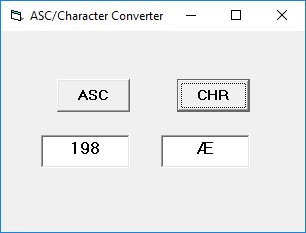
Figure 13.1: ASC to CHR converter application
13.10 The String Function
The String function creates a string consisting of a repeated character.
Private Sub Form_Load()
    Form1.Show
    Print String(30, "#")
End Sub
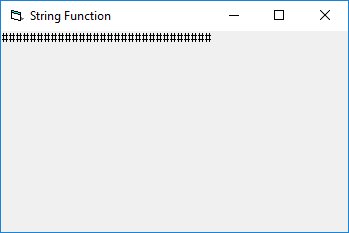
Figure 13.2: Output of String function
13.11 The vbCrLf Constant
The vbCrLf constant represents a carriage return and line feed combination, used for creating new lines.
Private Sub Command1_Click()
    Dim message As String
    Dim display As String

    message = "Mission to Mars"
    display = String(30, "*") & vbCrLf & message & vbCrLf & String(30, "*")
    MsgBox display
End Sub
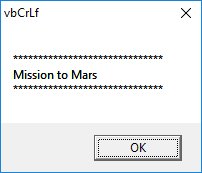
Figure 13.3: Message box using vbCrLf
13.12 Performing Word Search
Combine multiple string functions to create a word search application.
Private Sub cmdSearch_Click()
    Dim n, m, l As Integer
    Dim myArticle, myWord As String
    myArticle = TxtArticle.Text
    myWord = TxtWord.Text
    l = Len(myWord)
    n = InStr(1, myArticle, myWord)
    If n = 0 Then
        LblResult.Caption = "Your word not found, try again."
    Else
        LblResult.Caption = "Found your word " & myWord & " at Position " & n
        TxtArticle.SetFocus
        TxtArticle.SelStart = n - 1
        TxtArticle.SelLength = Len(myWord)
    End If
End Sub
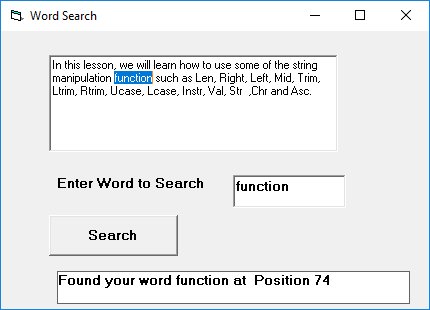
Figure 13.4: Word search application
Lesson Summary
In this lesson, you've mastered VB6's essential string manipulation functions:
Len Function
Returns the length of a string
Left & Right Functions
Extract characters from the beginning or end of strings
Trim Functions
Remove whitespace from strings
Mid Function
Extracts substrings from any position
InStr Function
Finds the position of substrings
Case Conversion
UCase and LCase for text case manipulation
Chr & Asc Functions
Convert between characters and ASCII codes
Best Practice
Combine multiple string functions to solve complex text processing tasks. Always consider case sensitivity when comparing or searching strings.
Practice Exercises
Test your understanding of VB6 string functions with these exercises:
Exercise 1: Text Reverser
Create a program that reverses a string using string functions. Input: "Visual Basic" → Output: "cisalB lausiV"
Exercise 2: Word Counter
Develop a word counter that counts the number of words in a paragraph using string functions.
Exercise 3: Password Validator
Create a password validator that checks for length, uppercase, lowercase, and numeric characters.
Exercise 4: Text Formatting Tool
Build a tool that formats text by capitalizing the first letter of each sentence and trimming extra spaces.
Exercise 5: CSV Parser
Create a simple CSV parser that extracts values from a comma-separated string.
Next Lesson
Continue your VB6 journey with Lesson 14: Sub Procedures.
Related Resources

Visual Basic 6 Made Easy
Start your programming journey with Visual Basic 6. Learn how to build Windows applications step-by-step using an easy and beginner-friendly approach.
- Perfect for beginners
- Learn core programming concepts
- Build real VB6 applications

Visual Basic 2026 Made Easy
Upgrade to modern Visual Basic with VB.NET, .NET 10, and Visual Studio 2026. Build real-world applications with modern tools and AI-powered development.
- Modern VB.NET development
- Hands-on projects and real apps
- GitHub Copilot & AI integration
🚀 Ready for the Next Level?
After learning the basics with VB6 Made Easy and upgrading to VB2026 Made Easy, continue your journey into advanced professional development.

Advanced VB.NET Programming
Take your VB.NET skills to the next level. Learn advanced programming techniques, real-world architectures, and professional development practices using modern .NET.
Best For:
- After VB6 or VB.NET fundamentals
- Intermediate to advanced learners
- Developers building real-world systems
🚀 Migrating from VB6 to VB.NET
Still using or learning classic Visual Basic 6? This practical step-by-step guide shows you how to migrate legacy VB6 applications to modern VB.NET with Visual Studio 2026 and .NET 10.

VB6 to Modern VB.NET Made Easy
A practical step-by-step guide to migrating legacy Visual Basic 6 applications to VB.NET with Visual Studio 2026 and .NET 10.
- Designed for VB6 programmers and legacy app maintainers
- Clear migration guidance from classic VB to modern .NET
- Perfect bridge between VB6 fundamentals and VB.NET development
🚀 Move to Modern VB.NET
Visual Basic 6 is your foundation — but modern development uses VB.NET with .NET and Visual Studio 2026.
Start VB.NET Tutorial →