Mastering Loops in VB6
Learn how to efficiently repeat code blocks with Do, For, and While loops
Lesson Overview
Key Takeaway
Loops are fundamental programming structures that enable efficient repetition of code blocks. Mastering loops is essential for automating repetitive tasks and creating efficient VB6 applications.
Welcome to Lesson 9 of our Visual Basic 6 Tutorial! In this lesson, you'll master VB6's powerful looping structures that allow you to efficiently repeat blocks of code. Loops are essential for automating repetitive tasks, processing collections of data, and creating dynamic applications.
9.1 Introduction to Loops
Loops are programming constructs that enable the execution of code blocks repeatedly until specific conditions are met. VB6 offers three primary loop structures:
Do Loops
Most flexible looping structure with condition checking at start or end
For...Next Loops
Ideal for iterating a specific number of times
While...Wend Loops
Simple looping while condition remains true
Figure 9.1: Loop Execution Flow
Visual representation of loop execution flow
How Loops Work
Loops repeatedly execute a block of code as long as a specified condition remains true. The condition is evaluated before each iteration (in pre-test loops) or after each iteration (in post-test loops). Proper loop termination is crucial to avoid infinite loops.
Initialization
Set starting values before entering the loop
Condition Check
Evaluate whether to continue looping
Iteration
Execute loop body and update control variable
9.2 The Do Loop
The Do Loop is the most flexible looping structure in VB6, with four syntax variations:
1 Pre-test While Loop
Do While condition
    ' Code to execute
Loop
Checks condition before each iteration
2 Post-test While Loop
Do
    ' Code to execute
Loop While condition
Checks condition after each iteration
3 Pre-test Until Loop
Do Until condition
    ' Code to execute
Loop
Runs until condition becomes true
4 Post-test Until Loop
Do
    ' Code to execute
Loop Until condition
Runs at least once before checking condition
Important Note
Pre-test loops may not execute at all if the initial condition is false, while post-test loops always execute at least once.
Example 9.1: Counting with Do Loop
Private Sub CountNumbers_Click()
    Dim counter As Integer
    counter = 1

    Do While counter <= 1000
        num.Text = counter
        counter = counter + 1
    Loop
End Sub
Counter Simulation:
9.3 Exiting the Loop
The Exit Do statement allows you to terminate a loop prematurely when a specific condition is met, providing greater control over loop execution.
Example 9.2: Summing Numbers with Exit Do
Dim sum, n As Integer

Private Sub Form_Activate()
    List1.AddItem "n" & vbTab & "sum"

    Do
        n = n + 1
        sum = sum + n
        List1.AddItem n & vbTab & sum

        If n = 100 Then
            Exit Do
        End If
    Loop
End Sub
Explanation
This procedure calculates the sum of numbers from 1 to 100 (1+2+3+...+100). The loop continues until n reaches 100, at which point Exit Do terminates the loop. The results are displayed in a ListBox control named List1.
9.4 The For...Next Loop
The For...Next loop is ideal when you know exactly how many times you want to repeat a block of code. Its structure is:
For counter = startNumber To endNumber [Step increment]
    ' One or more VB statements
Next [counter]
Basic For Loop
For counter = 1 To 10
    List1.AddItem counter
Next
Counts from 1 to 10, adding each number to a list box.
For Loop with Step
For counter = 1 To 1000 Step 10
    Print counter
Next
Counts from 1 to 1000 in increments of 10, printing each value.
Reverse For Loop
For counter = 1000 To 5 Step -5
    counter = counter - 10
    If counter < 50 Then
        Exit For
    Else
        Print "Keep Counting"
    End If
Next
Counts down from 1000 to 5 in decrements of 5, with an early exit condition.
Example 9.3: Multiplication Table Generator
Private Sub cmdGenerate_Click()
    Dim i, num As Integer
    num = Val(txtNumber.Text)
    lstTable.Clear

    For i = 1 To 12
        lstTable.AddItem num & " x " & i & " = " & (num * i)
    Next i
End Sub
Multiplication Table:
9.5 Nested For...Next Loops
Nested loops (loops within loops) are powerful for working with multi-dimensional data like grids or tables. The outer loop completes each full cycle of the inner loop before advancing.
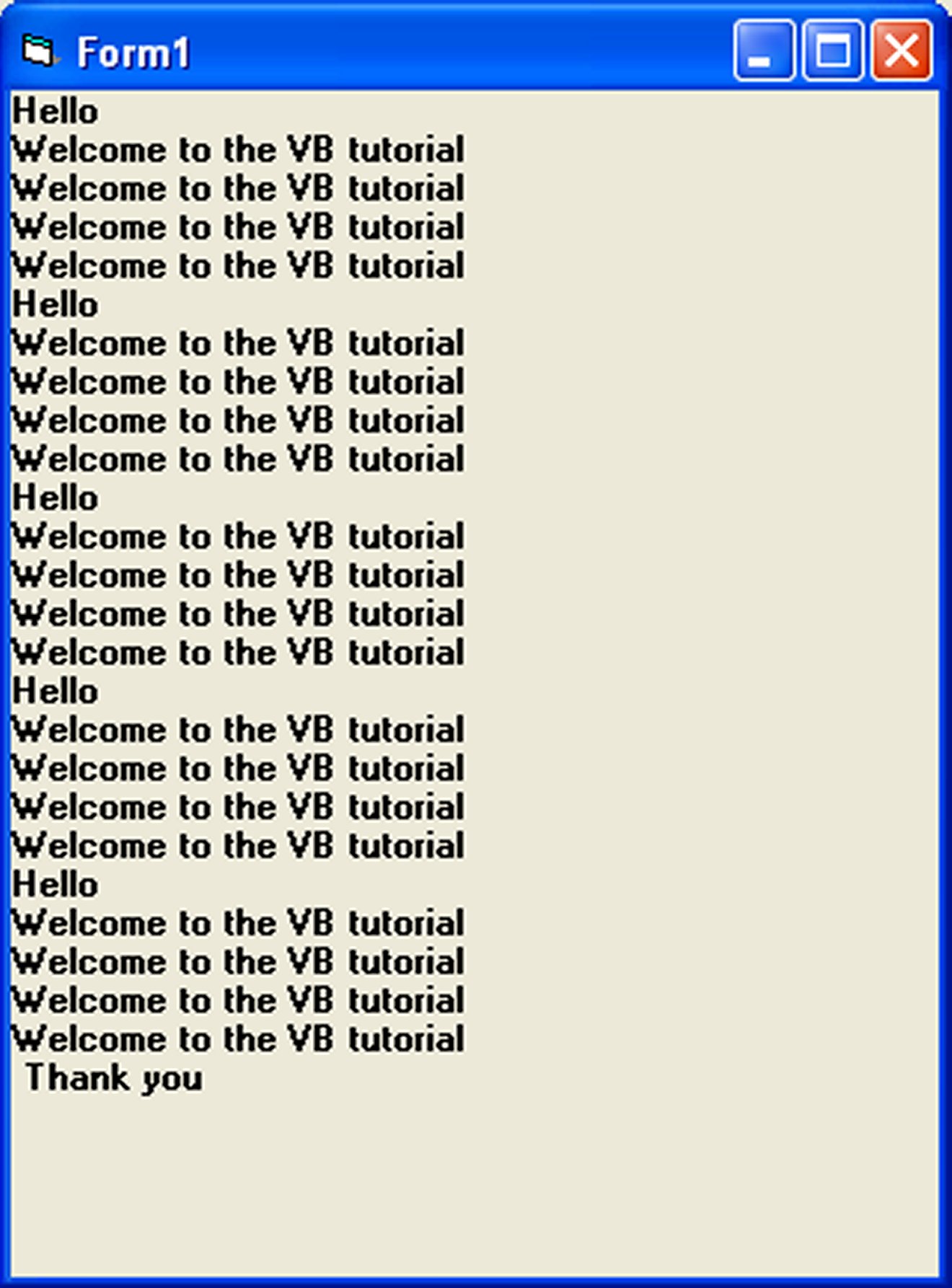
Example 9.4: Nested Loop Demonstration
Private Sub Form_Activate()
    For firstCounter = 1 To 5
        Print "Hello"

        For secondCounter = 1 To 4
            Print "Welcome to the VB tutorial"
        Next secondCounter
    Next firstCounter

    Print "Thank you"
End Sub
Explanation: The outer loop runs 5 times, printing "Hello" each time. The inner loop runs 4 times for each outer loop iteration, printing the welcome message. This results in 5 "Hello" messages and 20 welcome messages (5×4).
Example 9.5: Pattern Generator with Nested Loops
Private Sub cmdDrawPattern_Click()
    Dim i, j As Integer
    picPattern.Cls

    For i = 1 To 8
        For j = 1 To i
            picPattern.Print "*";
        Next j
        picPattern.Print
    Next i
End Sub
Explanation: This nested loop creates a right-angled triangle pattern of asterisks. The outer loop controls the rows, while the inner loop prints the asterisks in each row (increasing with each row).
Output pattern:
*
**
***
****
... up to 8 asterisks
Pattern Output:
9.6 The While...Wend Loop
The While...Wend loop is a simpler alternative to the Do loop, executing statements as long as a condition remains true.
While condition
    ' Statements
Wend
Example 9.6: Summing with While...Wend
Dim sum, n As Integer

Private Sub Form_Activate()
    List1.AddItem "n" & vbTab & "sum"

    While n < 100
        n = n + 1
        sum = sum + n
        List1.AddItem n & vbTab & sum
    Wend
End Sub
Explanation: This code calculates the cumulative sum of integers from 1 to 100, displaying each step in a ListBox. The loop continues as long as n is less than 100.
Lesson Summary
In this lesson, you've mastered the looping structures in VB6:
Do Loops
Offer maximum flexibility with condition checking at start or end
For...Next Loops
Ideal for fixed iterations with optional Step increments
Nested Loops
Handle multi-dimensional problems like grids and patterns
While...Wend Loops
Provide a simple syntax for condition-based looping
Loop Control
Exit Do/Exit For allow early termination when needed
Best Practice
Always ensure your loops have a clear termination condition to prevent infinite loops. When working with user input or external data, validate values before using them in loop conditions.
Practice Exercises
Test your understanding of loops with these exercises:
Exercise 1: Factorial Calculator
Create a program that calculates the factorial of a number using a For...Next loop. The factorial of n (n!) is the product of all positive integers less than or equal to n.
Exercise 2: Prime Number Finder
Write a program that finds all prime numbers between 1 and 100 using nested loops. Display the results in a list box.
Exercise 3: Number Guessing Game
Develop a number guessing game where the computer generates a random number between 1-100 and the user has up to 5 attempts to guess it, using a Do loop.
Exercise 4: Fibonacci Sequence
Create a program that prints the Fibonacci sequence up to a specified number of terms using a While...Wend loop.
Exercise 5: Multiplication Tables
Build a multiplication table generator that displays tables from 1 to 10 using nested For loops.
Next Lesson
Continue your VB6 journey with Lesson 10: Functions Overview.
Related Resources

Visual Basic 6 Made Easy
Start your programming journey with Visual Basic 6. Learn how to build Windows applications step-by-step using an easy and beginner-friendly approach.
- Perfect for beginners
- Learn core programming concepts
- Build real VB6 applications

Visual Basic 2026 Made Easy
Upgrade to modern Visual Basic with VB.NET, .NET 10, and Visual Studio 2026. Build real-world applications with modern tools and AI-powered development.
- Modern VB.NET development
- Hands-on projects and real apps
- GitHub Copilot & AI integration
🚀 Ready for the Next Level?
After learning the basics with VB6 Made Easy and upgrading to VB2026 Made Easy, continue your journey into advanced professional development.

Advanced VB.NET Programming
Take your VB.NET skills to the next level. Learn advanced programming techniques, real-world architectures, and professional development practices using modern .NET.
Best For:
- After VB6 or VB.NET fundamentals
- Intermediate to advanced learners
- Developers building real-world systems
🚀 Migrating from VB6 to VB.NET
Still using or learning classic Visual Basic 6? This practical step-by-step guide shows you how to migrate legacy VB6 applications to modern VB.NET with Visual Studio 2026 and .NET 10.

VB6 to Modern VB.NET Made Easy
A practical step-by-step guide to migrating legacy Visual Basic 6 applications to VB.NET with Visual Studio 2026 and .NET 10.
- Designed for VB6 programmers and legacy app maintainers
- Clear migration guidance from classic VB to modern .NET
- Perfect bridge between VB6 fundamentals and VB.NET development
🚀 Move to Modern VB.NET
Visual Basic 6 is your foundation — but modern development uses VB.NET with .NET and Visual Studio 2026.
Start VB.NET Tutorial →