
A function is similar to a normal procedure but the main purpose of the function is to accept a certain input and return a value which is passed on to the main program to finish the execution. There are two types of functions, the built-in functions (or internal functions) and the user-defined functions.
The general syntax of a function is
FunctionName (arguments)
The arguments are values that are passed on to the function.
In this lesson, we are going to learn two very basic but useful internal functions of Visual basic , i.e. the MsgBox( ) and InputBox ( ) functions.
The objective of MsgBox is to produce a pop-up message box and prompt the user to click on a command button before he /she can continues. This format is as follows:
yourMsg=MsgBox(Prompt, Style Value, Title)
The first argument, Prompt, will display the message in the message box. The Style Value will determine what type of command buttons appear on the message box, please refer ton Table 12.1 for types of command button displayed. The Title argument will display the title of the message board.
| Style Value | Named Constant | Buttons Displayed | 0 | vbOkOnly | Ok button |
|---|---|---|
| 1 | vbOkCancel | Ok and Cancel buttons |
| 2 | vbAbortRetryIgnore | Abort, Retry and Ignore buttons. |
| 3 | vbYesNoCancel | Yes, No and Cancel buttons |
| 4 | vbYesNo | Yes and No buttons |
| 5 | vbRetryCancel | Retry and Cancel buttons |
We can use named constants in place of integers for the second argument to make the programs more readable. In fact, VB6 will automatically shows up a list of named constants where you can select one of them.
example: yourMsg=MsgBox( "Click OK to Proceed", 1, "Startup Menu")
and yourMsg=Msg("Click OK to Proceed". vbOkCancel,"Startup Menu")
are the same.
yourMsg is a variable that holds values that are returned by the MsgBox ( ) function. The values are determined by the type of buttons being clicked by the users. It has to be declared as Integer data type in the procedure or in the general declaration section. Table 12.2 shows the values, the corresponding named constant and buttons.
| Value | Named Constant | Button Clicked |
|---|---|---|
| 1 | vbOk | Ok button |
| 2 | vbCancel> | Cancel button |
| 3 | vbAbort | Abort button |
| 4 | vbRetry | Retry button |
| 5 | vbIgnore | Ignore button |
| 6 | vbYes | Yes button |
| 7 | vbNo | No button |
Example 12.1
Private Sub Button1_Click(ByVal sender
As System.Object, ByVal e As System.EventArgs) Handles Button1.Click
Dim testmsg As Integer
testmsg = MsgBox("Click to test", 1, "Test message")
If testmsg = 1 Then
MessageBox.Show("You have clicked the OK button")
Else
MessageBox.Show("You have clicked the Cancel button")
End If
End Sub
To make the message box looks more sophisticated, you can add an icon besides the message. There are four types of icons available in VB2008 as shown in Table 12.3
| Value | Named Constant | Icon |
|---|---|---|
| 16 | vbCritical |
 |
| 3 | vbQuestion |
 |
| 48 | vbExclamation |  |
| 64 | vbInformation | 
|
 Private Sub Button1_Click(ByVal sender As System.Object,ByVal e As System.EventArgs) Handles Button1.Click
  Dim testMsg As Integer
  testMsg = MsgBox("Click to Test", vbYesNoCancel + vbExclamation, "Test Message")
  If testMsg = 6 Then
   MessageBox.Show("You have clicked the yes button")
  ElseIf testMsg = 7 Then
   MessageBox.Show("You have clicked the NO button")
  Else
   MessageBox.Show("You have clicked the Cancel button")
  End If
 End Sub
The first argument, Prompt, will display the message. The output is as shown below:
An InputBox( ) function will display a message box where the user can enter a
value or a message in the form of text. In VB2005, you can use the following structure: myMessage is a variant data type but typically it is declared as string,
which accept the message input by the users. The arguments are explained as
follows: However, the format won't work in VB2008
because InputBox is considered a namespace. So, you need to key in the full
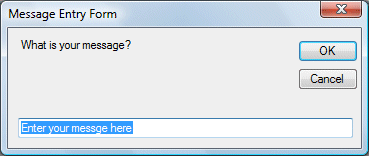
reference to the Inputbox namespace, which is The parameters remain the same. The inputbox will appear as shown in the
figure below when you press the command button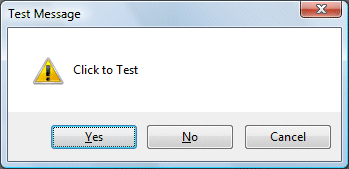
12.2 The InputBox( ) Function
myMessage=InputBox(Prompt, Title, default_text, x-position, y-position)
Microsoft.VisualBasic.InputBox(Prompt, Title, default_text, x-position, y-position)
Example 12.3
Private Sub Button1_Click(ByVal sender As System.Object, ByVal e As System.EventArgs) Handles Button1.Click>
 Dim userMsg As String
 userMsg = Microsoft.VisualBasic.InputBox("What is your message?", "Message
 Entry Form", "Enter your messge here", 500, 700)
 If userMsg <> "" Then
  MessageBox.Show(userMsg)
 Else
  MessageBox.Show("No Message")
 End If
End Sub
Copyright©2008 Dr.Liew Voon Kiong. All rights reserved |Contact|Privacy Policy
