
Visual Basic 2008 is very much similar to Visual Basic 6 in terms of syntaxes and program structure, but their underlying concepts are very different. The main difference is that VB2008 is an object-oriented Programming Language under the .NET framework. Although VB6 may have some OOP capabilities, it is not an object-oriented programming language.
Visual Basic 6 is not an object-oriented programming language because it does not have inheritance capabilities. On the other hand, VB2008 is an Object Oriented Programming Language, just like other OOP such as C++ and Java. It is different from VB6 because it focuses more on the data itself while VB6 focuses more on the actions. VB6 is known as a procedural or functional programming language. Some other procedural programming languages are C, Pascal, and Fortran.
An object-oriented programming language has three core technologies namely
The three concepts of OOP are explained below:
Encapsulation refers to the creation of self-contained modules that bind processing functions to the data. These user-defined data types are called classes. Each class contains data as well as a set of methods which manipulate the data. The data components of a class are called instance variables and one instance of a class is an object. For example, in a library system, a class could be a member, and John and Sharon could be two instances (two objects) of the library class.
In object-oriented programming, classes are created according to their hierarchies, and inheritance allows the structure and methods in one class to be passed down the hierarchy to another class. That means less programming is required when adding functions to complex systems, therefore save time and effort. If we add a step at the bottom of a hierarchy, we only need to add the processing and data associated with that unique step. Everything else about that step is inherited. The ability to reuse existing objects is a major advantage of object-oriented programming.
Object-oriented programming allows procedures about objects to be created whose exact type is not known until runtime. For example, a screen cursor may change its shape from an arrow to a line depending on the program mode. The routine to move the cursor on the screen in response to mouse movement would be written for "cursor," and polymorphism allows that cursor to take on whatever shape is required at runtime. It also allows new shapes to be easily integrated.
Visual Basic 2008 allows users to write programs that break down into modules. These modules represent the real-world objects known as classes or types. An object can be created out of a class known as an instance of the class. A class can also comprise subclass. For example, the apple tree is a subclass of the plant class and the apple in your backyard is an instance of the apple tree class. Another example is student class is a subclass of the human class while your son John is an instance of the student class.
A class consists of data members as well as methods. In VB2008, the program structure to define a Human class can be written as follows:
Public Class Human
 'Data Members
Private Name As String
Private Birthdate As String
Private Gender As String
Private Age As Integer
 'Methods
 Overridable Sub ShowInfo( )
 MessageBox.Show(Name)
 MessageBox.Show(Birthdate)
 MessageBox.Show(Gender)
 MessageBox.Show(Age)
End Sub
End Class
Let's look at one example of how to create a class. The following example shows you how to create a class that can calculate your BMI (Body Mass Index). To create a class, start VB2008 as usual and choose Windows Applications. In the VB2008 IDE, click on Project on the menu bar and select Add Class, the Add New Item dialog appears, as shown in the Figure 4.1 below:
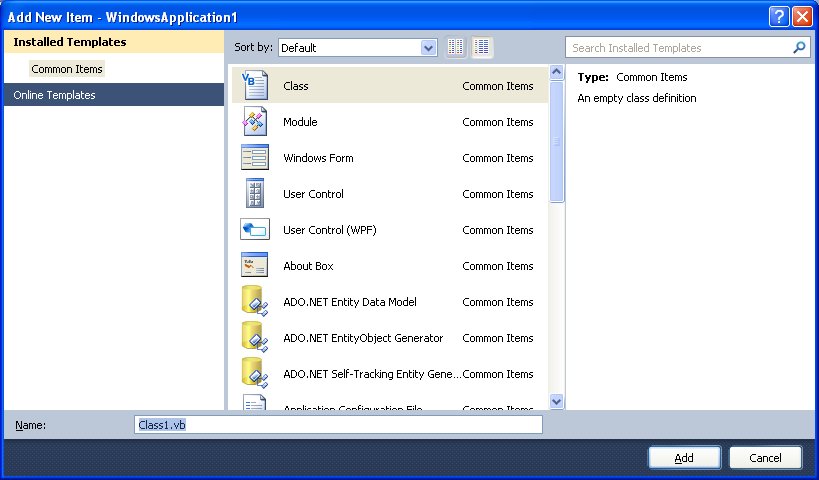
The default class Class1.vb will appear as a new tab in a code window. Rename the class as MyClass.vb. Rename the form as MyFirstClass.vb.
Now, in the MyClass.vb window, enter the follow codePublic Function BMI(ByVal height As Single, ByVal weight As Single) BMI = Format((weight) / (height ^ 2), "0.00") End Function
Now you have created a class (an object) called MyClass with a method known as BMI. In order to use the BMI class, insert a button into the form and click on the button to enter the following code:
Private Sub BtnCalBmi_Click(ByVal sender As System.Object, ByVal e As System.EventArgs) Handles BtnCalBmi.Click
Dim MyObject As Object
Dim h, w As Single
 MyObject = New MyClass1()
 h = InputBox("What is your height in meter")
 w = InputBox("What is your weight in kg")
 MessageBox.Show(MyObject.BMI(h, w))
End Sub
When you run this program and click the button, the user can enter his or her height and weight subsequently into two input boxes and the value of BMI will be shown in a pop-up message box.
Copyright©2008 Dr.Liew Voon Kiong. All rights reserved |Contact|Privacy Policy
