
String manipulation is an important part of programming because it helps to process data that come in the form of non-numeric types such as name, address, gender, city, book title and more.
Strings can be manipulated using the & sign and the + sign, both perform the string concatenation which means combining two or more smaller strings into larger strings. For example, we can join "Visual" and "Basic" into "Visual Basic" using "Visual"&"Basic" or "Visual "+"Basic", as shown in the example below
Public Class Form1
Private Sub Button1_Click(ByVal sender As System.Object, ByVal e As
System.EventArgs) Handles Button1.Click
Dim text1, text2, text3 As String
text1 = "Visual"
text2 = "Basic"
text3 = text1 + text2
Label1.Text = text3
End Sub
End Class
The line text3=text1+ text2 can be replaced by text3=text1 & text2 and produced the same output. However, if one of the variables is declared as numeric data type, you cannot use the + sign, you can only use the & sign.
Example 8.2
Dim text1, text3 as string
Dim Text2 As Integer
text1 = "Visual"
text2=22
text3=text1+text2
Label1.Text = text3
This code will produce an error because of data mismatch.However, using & instead of + will be all right.
Dim text1, text3 as string
Dim Text2 As Integer
text1 = "Visual"
text2=22
text3=text1 & text2
Label1.Text = text3
You can combine more than two strings to form a larger strings, like the following example:
Public Class Form1
Private Sub Button1_Click(ByVal sender As System.Object, ByVal e As
System.EventArgs) Handles Button1.Click
Dim text1, text2, text3, text4, text5, text6 As String
text1 = "Welcome"
text2 = " to"
text3 = " Visual"
text4 = " Basic"
text5 = " 2008"
text6 = text1 + text2 + text3+text4+Text5
Label1.Text = text6
End Sub
End Class
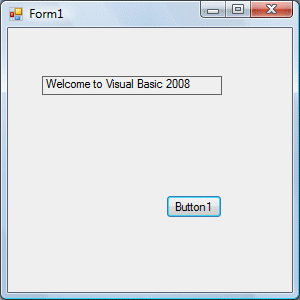
Running the above program will produce the screen shotas shown in Figure 8.1.
A function is similar to a normal procedure but the main purpose of the function is to accept a certain input and return a value which is passed on to the main program to finish the execution.There are numerous string manipulation functions built into VB2008 but I will only discuss a few here and will explain the rest of them in later lessons.
The length function returns an integer value which is the length of a phrase or a sentence, including the empty spaces. The format is
Len(“Phrase”)
For example,
Len (Visual Basic)= 12 and Len (welcome to VB tutorial) = 22
 Public Class Form1
 Private Sub Button1_Click(ByVal sender As System.Object, ByVal e As System.EventArgs) Handles Button1.Click
  Label1.Text =
  Len(TextBox1.Text)
  End Sub
 End Class
The output is shown in Figure 8.2

The Right function extracts the right portion of a phrase. The format for Visual Basic 6 is
Right (“Phrase”, n)
Where n is the starting position from the right of the phase where the portion of the phrase is going to be extracted. For example,
Right(“Visual Basic”, 4) = asic
However, this format is not applicable in VB2008. In VB2008, we need use the following format
Microsoft.VisualBasic.Right("Phrase",n)
Example 8.3
Private Sub Button1_Click(ByVal
sender As System.Object, ByVal e As System.EventArgs) Handles
Button1.Click
Dim text1 As String
text1 = TextBox1.Text
Label1.Text = Microsoft.VisualBasic.Right(text1, 4)
End Sub
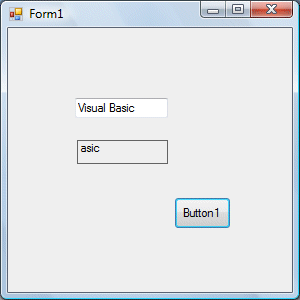
The above program will return four right most characters of the phrase entered into the textbox.
The Output
The Left function extract the left portion of a phrase. The format is
Microsoft.VisualBasic.Left("Phrase",n)
Where n is the starting position from the left of the phase where the portion of the phrase is going to be extracted. For example,
Microsoft.VisualBasic.Left (“Visual Basic”, 4) = Visu .
I Other functions will be discussed in future lessons.
Copyright©2008 Dr.Liew Voon Kiong. All rights reserved |Contact|Privacy Policy
