
Before writing an event procedure for the control to response to a user's input, you have to set certain properties for the control to determine its appearance and how it will work with the event procedure. You can set the properties of the controls in the properties window at design time or at runtime.
Figure 3.1 is a typical properties window for a form in Visual Basic 2008.
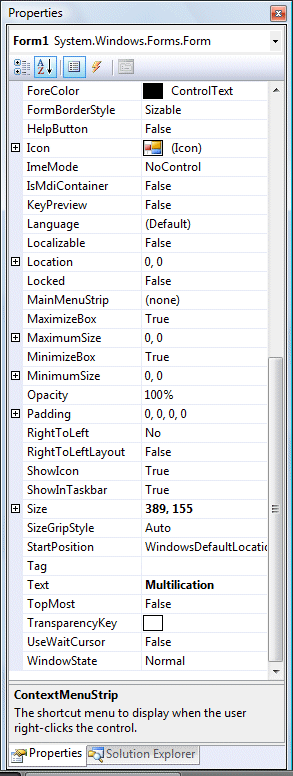

The title of the form is defined by the Text property and its default name is Form 1. To change the form's title to any name that you like, simple click in the box on the right of the Text property and type in the new name, in this example, the title is Multiplication. Notice that this title will appear on top of the windows. In the properties window, the item appears at the top part is the object currently selected (in Figure 3.1, the object selected is Form1). At the bottom part, the items listed in the left column represent the names of various properties associated with the selected object while the items listed in the right column represent the states of the properties. Properties can be set by highlighting the items in the right column then change them by typing or selecting the options available. You may also alter other properties of the form such as font, location, size, foreground color, background color ,MaximizeBox, MinimizeBox and etc.
You can also change the properties of the object at runtime to give special effects such as change of color, shape, animation effect and so on. For example the following code will change the form color to yellow every time the form is loaded. VB2008 uses RGB(Red, Green, Blue) to determine the colors. The RGB code for yellow is 255,255,0. Me in the code refer to the current form and Backcolor is the property of the form's background color. The formula to assign the RGB color to the form is Color.FormArbg(RGB codes).
Public Class Form1
Private Sub Form1_Load(ByVal sender As System.Object, ByVal e As System.EventArgs) Handles MyBase.LoadMe.BackColor = Color.FromArgb(255, 255, 0)
End Sub
End Class
You may also use the follow procedure to assign the color at run time.
Private Sub Form1_Load(ByVal sender As System.Object, ByVal e As System.EventArgs) Handles MyBase.Load
Me.BackColor = Color.Yellow
End Sub
Both procedures above will load the form with a yellow background as shown in Figure 3.3.

The following table shows some of the common colors and the corresponding RGB codes. You can always experiment with other combinations, but remember the maximum number for each color is 255 and the minimum number is 0.
| Color | RGB code | Color | RGB code | Color | RGB Code |
|---|---|---|---|---|---|
| . | 255,0,0 | 255, 255, 0 | 255, 165, 0 | ||
| 0,255,0 | 0, 255, 255 | 0, 0, 0 | |||
| 0, 0, 255 | 255, 0, 255 | 255, 255, 255 |
The following is another program that allows the user to enter the RGB codes into three different textboxes and when he/she clicks the display color button, the background color of the form will change according to the RGB codes, as shown in Figure 3.4. Hence, this program allows users to change the color properties of the form at run time.

Private Sub Button1_Click(ByVal sender As System.Object, ByVal e As System.EventArgs) Handles Button1.Click
Dim rgb1, rgb2, rgb3 As
Integer
rgb1 = TextBox1.Text
rgb2 = TextBox2.Text
rgb3 = TextBox3.Text
Me.BackColor = Color.FromArgb(rgb1, rgb2, rgb3)
End Sub
Copyright©2008 Dr.Liew Voon Kiong. All rights reserved |Contact|Privacy Policy
