
Computer can perform mathematical calculations much faster than human beings. However, computer itself cannot perform any mathematical calculations without receiving instructions from the user. In VB2008, we can write code to instruct the computer to perform mathematical calculations such as addition, subtraction, multiplication, division and other kinds of arithmetic operations. In order for VB2008 to carry out arithmetic calculations, we need to write code that involve the use of various arithmetic operators. The VB2008 arithmetic operators are very similar to the normal arithmetic operators, only with slight variations. The plus and minus operators are the same while the multiplication operator use the * symbol and the division operator use the / symbol.The list of VB2008 arithmetic operators are shown in table 7.1 :
Table 7.1: Arithmetic Operators
| Operator | Mathematical Function | Example |
|---|---|---|
| + | Addition | 1+2=3 |
| - | Subtraction | 10-4=6 |
| ^ | Exponential | 3^2=9 |
| * | Multiplication | 5*6=30 |
| / | Division | 21/7=3 |
| Mod | Modulus(returns the remainder of an integer division) | 15 Mod 4=3 |
| \ | Integer Division(discards the decimal places) | 19/4=4 |
In this program, you need to insert two text boxes, four labels and one button. Click the button and enter the code as shown below. When you run the program, it will perform the four basic arithmetic operations and display the results on the four labels.
Private Sub Button1_Click(ByVal sender As System.Object, ByVal e As System.EventArgs) Handles Button1.Click
Dim sum, num1, num2, difference, product, quotient As Single
num1 = TextBox1.Text
num2 = TextBox2.Text
sum=num1+num2
difference=num1-num2
product = num1 * num2
quotient=num1/num2
Label1.Text=sum
Label2.Text=difference
Label3.Text = product
Label4.Text = quotient
End Sub
The program can use Pythagoras Theorem to calculate the length of hypotenuse c given the length of the adjacent side a and the opposite side b. In case you have forgotten the formula for the Pythagoras Theorem, it is written as
c^2=a^2+b^2
Private Sub Button1_Click(ByVal sender As System.Object, ByVal e As System.EventArgs) Handles Button1.Click
Dim a, b, c As Single
a = TextBox1.Text
b = TextBox2.Text
c=(a^2+b^2)^(1/2)
Label3.Text=c
End Sub
A lot of people are obese now and it could affect their health seriously . Obesity has proven by the medical experts to be a one of the main causes of various medical problems, including the heart disease and diabetics. If a person BMI is more than 30, he or she can be considered obese. You can refer to the following range of BMI values for your weight status.
In order to calculate your BMI, you do not have to consult your doctor, you could just use a calculator or a home made computer program, this is exactly what I am showing you here. The BMI calculator is a Visual Basic program that can calculate the body mass index, or BMI of a person based on the body weight in kilogram and the body height in meter. BMI can be calculated using the formula weight/( height )2, where weight is measured in kg and height in meter. If you only know your weight and height in lb and feet, then you need to convert them to the metric system (you could indeed write a VB program for the conversion).
Private Sub Button1_Click(ByVal sender As System.Object, ByVal e As System.EventArgs) Handles Button1.Click
Dim height,
weight, bmi As Single
height = TextBox1.Text
weight = TextBox2.Text
bmi = (weight) / (height ^ 2)
Label4.Text = bmi
End Sub
The output is shown in Figure 7.1. In this example, your height is 1.80m( about 5 foot 11),your weight is 78 kg( about 170 Ib), and your BMI is found to be 23.5. The reading suggests that you are healthy. (Note; 1 foot=0.3048, 1 lb=.45359237 kilogram)
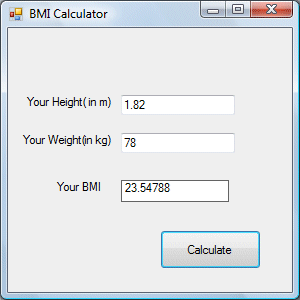
From the above examples, you can see that performing arithmetic operations is relatively easy in VB2008. Here are more arithmetic projects you can try to programs:
Copyright©2008 Dr.Liew Voon Kiong. All rights reserved |Contact|Privacy Policy
