Interactive Prime Number Tester
Test any number to see if it's prime. Enter a number below or click on numbers in the grid.
How it works?
What is a Prime Number?
A prime number is a natural number greater than 1 that has no positive divisors other than 1 and itself. Prime numbers are the building blocks of number theory and have fascinated mathematicians for centuries.
Key Characteristics:
- Must be greater than 1
- Divisible only by 1 and itself
- 2 is the only even prime number
- 1 is not considered a prime number
Examples of prime numbers: 2, 3, 5, 7, 11, 13, 17, 19, 23, 29, 31, 37, 41, 43, 47, 53, 59, 61, 67, 71, 73, 79, 83, 89, 97
Why Test for Prime Numbers?
Prime number testing is fundamental to:
- Cryptography (RSA encryption)
- Computer security algorithms
- Mathematical research
- Optimization problems
- Programming education
Interactive Prime Number Tester
Test any number to see if it's prime. Enter a number below or click on numbers in the grid.
Prime Numbers (2-100)
Visual Basic 6 Implementation
This VB6 program tests whether a number entered by the user is prime. It uses a straightforward approach by checking divisibility from 2 to n-1.
Interface Design:
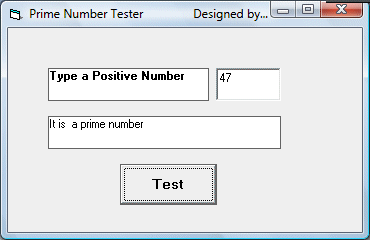
VB6 Code:
Private Sub Command1_Click()
    Dim N, D As Single
    Dim tag As String

    N = Val(TxtNumber.Text)

    Select Case N
        Case Is < 2
            Lbl_Answer.Caption = "It is not a prime number"

        Case Is = 2
            Lbl_Answer.Caption = "It is a prime number"

        Case Is > 2
            D = 2
            Do
                If N / D = Int(N / D) Then
                    Lbl_Answer.Caption = "It is not a prime number"
                    tag = "Not Prime"
                    Exit Do
                End If
                D = D + 1

            Loop While D <= N - 1

            If tag <> "Not Prime" Then
                Lbl_Answer.Caption = "It is a prime number"
            End If
    End Select
End Sub
How the VB6 Code Works:
- Get the input number from the textbox
- Handle special cases: numbers less than 2 are not prime
- 2 is the only even prime number
- For numbers greater than 2, check divisibility from 2 to n-1
- If any divisor is found, mark as "Not Prime" and exit the loop
- If no divisors are found, the number is prime
Visual Basic .NET Implementation
This VB.NET version uses a more efficient algorithm and modern programming techniques. It only checks divisors up to the square root of the number.
Public Class PrimeTester
    Private Sub btnCheck_Click(sender As Object, e As EventArgs) Handles btnCheck.Click
        Dim number As Integer
        If Integer.TryParse(txtNumber.Text, number) Then
            If IsPrime(number) Then
                lblResult.Text = number.ToString() & " is a prime number."
            Else
                lblResult.Text = number.ToString() & " is not a prime number."
            End If
        Else
            lblResult.Text = "Please enter a valid integer."
        End If
    End Sub

    Private Function IsPrime(n As Integer) As Boolean
        ' Handle special cases
        If n <= 1 Then Return False
        If n = 2 Then Return True
        If n Mod 2 = 0 Then Return False

        ' Only check odd factors up to square root
        Dim limit As Integer = Math.Sqrt(n)
        For i As Integer = 3 To limit Step 2
            If n Mod i = 0 Then
                Return False
            End If
        Next

        Return True
    End Function

    Private Sub btnNextPrime_Click(sender As Object, e As EventArgs) Handles btnNextPrime.Click
        Dim current As Integer
        If Integer.TryParse(txtNumber.Text, current) AndAlso current >= 1 Then
            txtNumber.Text = FindNextPrime(current + 1).ToString()
            btnCheck.PerformClick()
        End If
    End Sub

    Private Function FindNextPrime(start As Integer) As Integer
        Dim candidate As Integer = If(start Mod 2 = 0, start + 1, start)

        While True
            If IsPrime(candidate) Then
                Return candidate
            End If
            candidate += 2
        End While
    End Function
End Class
Advantages of the VB.NET Version:
- More efficient algorithm (checks only up to √n)
- Only checks odd numbers after 2
- Uses modern .NET functions and error handling
- Includes helper function to find next prime
- Better input validation with Integer.TryParse
Algorithm Comparison
Basic Algorithm (VB6)
- Checks all numbers from 2 to n-1
- Simple to understand
- Inefficient for large numbers
- Time complexity: O(n)
- Good for small numbers and educational purposes
Optimized Algorithm (VB.NET)
- Checks only up to √n
- Skips even numbers after 2
- Much faster for large numbers
- Time complexity: O(√n)
- More suitable for production code
Performance Comparison
| Number | VB6 Approach (Iterations) | VB.NET Approach (Iterations) | Time Savings |
|---|---|---|---|
| 100 | 98 | 4 (check 3,5,7,9) | 95.9% |
| 1,000 | 998 | 15 | 98.5% |
| 10,000 | 9,998 | 50 | 99.5% |
| 100,000 | 99,998 | 166 | 99.8% |