Mastering Mathematical Functions in VB6
Learn to use Rnd, Int, Sqr, Abs, Exp, Fix, Round, and Log with practical examples
Lesson Overview
Key Takeaway
Mathematical functions in VB6 enable you to perform complex calculations, generate random numbers, and solve mathematical problems efficiently in your applications.
Welcome to Lesson 11 of our Visual Basic 6 Tutorial! In this lesson, you'll master VB6's essential mathematical functions. These functions are crucial for creating applications that involve calculations, simulations, games, and data analysis.
11.1 The Rnd Function: Random Number Generation
The Rnd function is essential for applications involving probability, simulations, games, and random selections. It returns a random Single value between 0 (inclusive) and 1 (exclusive).
Important Note
Always use Randomize before calling Rnd to ensure different random sequences each time your program runs. Without it, you'll get the same sequence of "random" numbers every time!
Example 11.1: Generating Random Numbers
Private Sub Form_Activate()
    Dim x As Integer

    Randomize   ' Initialize random number generator

    For x = 1 To 10
        Print Rnd
    Next x
End Sub
Random Numbers Output:
Practical Application: Simulating Dice Rolls
To create useful random numbers, we often need to scale and convert the output of Rnd. The formula for generating random integers in a specific range is:
Int((upperbound - lowerbound + 1) * Rnd + lowerbound)
For a 6-sided die (values 1-6), the formula becomes:
Int(Rnd * 6) + 1
Example 11.2: Virtual Die Simulator
Dim num As Integer

Private Sub cmdRoll_Click()
    Randomize
    num = Int(Rnd * 6) + 1
    lblDie.Caption = num
End Sub
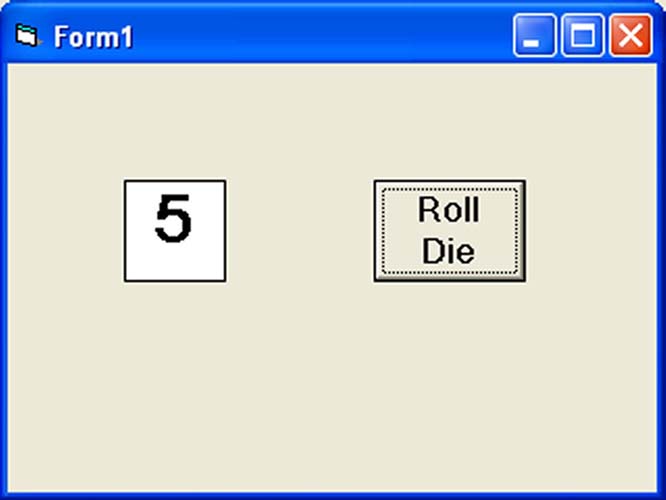
Figure 11.1: Virtual die showing a roll result of 3
11.2 Essential Numeric Functions
VB6 provides a comprehensive set of mathematical functions for various operations. Understanding these functions is crucial for efficient programming.
Rounding Functions
| Function | Description | Example |
|---|---|---|
| Int | Largest integer ≤ number | Int(4.8)=4 Int(-4.3)=-5 |
| Fix | Integer portion of number | Fix(4.8)=4 Fix(-4.3)=-4 |
| Round | Rounds to specified decimals | Round(3.14159,2)=3.14 |
Calculation Functions
| Function | Description | Example |
|---|---|---|
| Sqr | Square root | Sqr(16)=4 |
| Abs | Absolute value | Abs(-7.25)=7.25 |
Exponential Functions
| Function | Description | Example |
|---|---|---|
| Exp | e raised to a power | Exp(1)=2.71828 |
| Log | Natural logarithm | Log(10)≈2.302585 |
Example 11.3: Comparing Int, Fix, and Round
Private Sub Form_Activate()
    Dim n As Integer
    Dim x As Single

    Print "n", "x", "Int(x)", "Fix(x)", "Round(x, 4)"

    For n = 1 To 10
        x = Round(Rnd * 7, 7)
        Print n, x, Int(x), Fix(x), Round(x, 4)
    Next n
End Sub
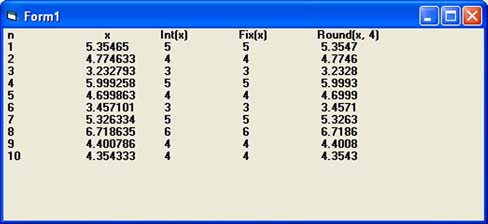
Figure 11.2: Comparing Int, Fix, and Round functions
Key Differences: Int vs Fix
1 Int Function
- Returns the largest integer ≤ the number
- For positive numbers: truncates decimals
- For negative numbers: rounds down to next lower integer
- Int(7.8) = 7
- Int(-7.2) = -8
2 Fix Function
- Returns the integer portion of a number
- For positive numbers: same as Int
- For negative numbers: truncates decimals (rounds toward zero)
- Fix(7.8) = 7
- Fix(-7.2) = -7
New Example: Hypotenuse Calculator
Private Sub cmdCalculateHyp_Click()
    Dim a As Double, b As Double, c As Double

    ' Get user input
    a = Val(InputBox("Enter length of side A:", "Right Triangle"))
    b = Val(InputBox("Enter length of side B:", "Right Triangle"))

    ' Calculate hypotenuse using Pythagorean theorem
    If a > 0 And b > 0 Then
        c = Round(Sqr(a ^ 2 + b ^ 2), 2)
        MsgBox "Hypotenuse = " & c, vbInformation, "Result"
    Else
        MsgBox "Please enter positive numbers", vbExclamation, "Error"
    End If
End Sub
Explanation: This example uses Val for conversion, Sqr for square root, ^ for exponents, and Round for precision. It also demonstrates input validation.
Math Function Simulator
Test different mathematical functions with custom inputs
Lesson Summary
In this lesson, you've mastered VB6's essential mathematical functions:
Rnd Function
Generate random numbers for simulations and games
Rounding Functions
Int, Fix, and Round for different rounding scenarios
Calculation Functions
Sqr for square roots, Abs for absolute values
Exponential Functions
Exp for exponentials, Log for natural logarithms
Randomize
Essential for initializing the random number generator
Best Practice
Always validate inputs before performing mathematical operations. For example, check for negative numbers before using Sqr, and verify numbers are within the valid range for Log.
Practice Exercises
Test your understanding of VB6 mathematical functions with these exercises:
Exercise 1: Random Password Generator
Create a program that generates a random 8-character password containing uppercase letters (A-Z). Use Chr() and Rnd together (A-Z characters are ASCII 65-90).
Exercise 2: Quadratic Equation Solver
Create a program that solves quadratic equations (ax² + bx + c = 0). Use Sqr for the discriminant and handle cases with real and complex roots.
Exercise 3: Compound Interest Calculator
Calculate compound interest using the formula A = P(1 + r/n)^(nt). Use Exp and Log for continuous compounding option.
Exercise 4: Statistics Calculator
Create a program that calculates the mean and standard deviation of 10 random numbers between 1 and 100. Use Sqr for standard deviation.
Exercise 5: Geometry Calculator
Create a program that calculates the volume of different shapes (sphere, cylinder, cone) based on user input. Use Round for precision.
Next Lesson
Continue your VB6 journey with Lesson 12: Formatting Functions.
Related Resources

Visual Basic 6 Made Easy
Start your programming journey with Visual Basic 6. Learn how to build Windows applications step-by-step using an easy and beginner-friendly approach.
- Perfect for beginners
- Learn core programming concepts
- Build real VB6 applications

Visual Basic 2026 Made Easy
Upgrade to modern Visual Basic with VB.NET, .NET 10, and Visual Studio 2026. Build real-world applications with modern tools and AI-powered development.
- Modern VB.NET development
- Hands-on projects and real apps
- GitHub Copilot & AI integration
🚀 Ready for the Next Level?
After learning the basics with VB6 Made Easy and upgrading to VB2026 Made Easy, continue your journey into advanced professional development.

Advanced VB.NET Programming
Take your VB.NET skills to the next level. Learn advanced programming techniques, real-world architectures, and professional development practices using modern .NET.
Best For:
- After VB6 or VB.NET fundamentals
- Intermediate to advanced learners
- Developers building real-world systems
🚀 Migrating from VB6 to VB.NET
Still using or learning classic Visual Basic 6? This practical step-by-step guide shows you how to migrate legacy VB6 applications to modern VB.NET with Visual Studio 2026 and .NET 10.

VB6 to Modern VB.NET Made Easy
A practical step-by-step guide to migrating legacy Visual Basic 6 applications to VB.NET with Visual Studio 2026 and .NET 10.
- Designed for VB6 programmers and legacy app maintainers
- Clear migration guidance from classic VB to modern .NET
- Perfect bridge between VB6 fundamentals and VB.NET development
🚀 Move to Modern VB.NET
Visual Basic 6 is your foundation — but modern development uses VB.NET with .NET and Visual Studio 2026.
Start VB.NET Tutorial →