Math Operations
In Visual Basic 2015, we can instruct the computer to perform arithmetic calculations such as addition, subtraction, multiplication, division, exponentiation, modulus, and integer division. This lesson introduces the main arithmetic operators and shows how they can be used in practical programs such as a simple calculator, a Pythagoras theorem program, and a BMI calculator.
Arithmetic coding is one of the most practical parts of programming. Once you understand the operators, you can create calculators, converters, financial tools, geometry applications, and many other useful programs.
Lesson Overview
11.1 Introduction
Arithmetic Operators in Visual Basic 2015
Visual Basic 2015 arithmetic operators are very similar to ordinary mathematical operators, with only slight differences in notation. The plus and minus signs remain the same, multiplication is written with *, and division is written with /.
The list below shows the main arithmetic operators used in VB2015.
| Operator | Mathematical Function | Example |
|---|---|---|
| + | Addition | 1 + 2 = 3 |
| - | Subtraction | 10 - 4 = 6 |
| ^ | Exponential | 3 ^ 2 = 9 |
| * | Multiplication | 5 * 6 = 30 |
| / | Division | 21 / 7 = 3 |
| Mod | Modulus, returns the remainder of integer division | 15 Mod 4 = 3 |
| \ | Integer Division, discards decimal places | 19 \ 4 = 4 |
11.2 Example 11.1
A Four-Operation Calculator
In this example, you create a simple calculator that performs addition, subtraction, multiplication, and division. Insert two text boxes, four labels, and one button. Then change the control names as follows:
- Button → BtnCal
- Text boxes → TxtNum1 and TxtNum2
- Labels → LblSum, LblDiff, LblPdct, and LblQuo
Private Sub BtnCal_Click(ByVal sender As System.Object, ByVal e As System.EventArgs) Handles BtnCal.Click
    Dim num1, num2, sum, difference, product, quotient As Single
    num1 = TxtNum1.Text
    num2 = TxtNum2.Text
    sum = num1 + num2
    difference = num1 - num2
    product = num1 * num2
    quotient = num1 / num2
    LblSum.Text = sum
    LblDiff.Text = difference
    LblPdct.Text = product
    LblQuo.Text = quotient
End Sub
When the user enters two numbers and clicks the button, the program calculates the four basic arithmetic results and displays them on the labels.
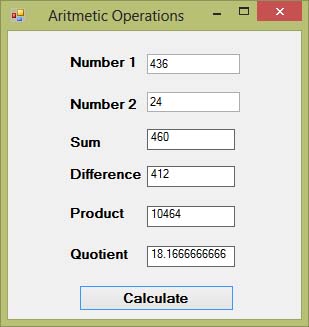
Figure 11.1: Output of the four-operation calculator
11.3 Example 11.2
Pythagoras Theorem Program
Pythagoras theorem is used to calculate the length of the hypotenuse of a right triangle. The formula is:
c^2 = a^2 + b^2In Visual Basic 2015, this can be written as:
c1 = (a1 ^ 2 + b1 ^ 2) ^ (1 / 2)In this example, insert two text boxes for the adjacent side a and opposite side b, one label for the result, and one button for calculation. The original example also includes code to draw a triangle at runtime.
Private Sub BtnCal_Click(ByVal sender As System.Object, ByVal e As System.EventArgs) Handles Button1.Click

    'To draw a triangle at runtime
    Dim myPen As Pen
    Dim A As New Point(10, 10)
    Dim B As New Point(100, 50)
    Dim C As New Point(60, 150)
    Dim myPoints As Point() = {A, B, C}
    myPen = New Pen(Drawing.Color.Blue, 5)
    Dim myGraphics As Graphics = Me.CreateGraphics
    myGraphics.DrawPolygon(myPen, myPoints)

    'Pythagoras equation
    Dim a1, b1, c1 As Single
    a1 = TxtA.Text
    b1 = TxtB.Text
    c1 = (a1 ^ 2 + b1 ^ 2) ^ (1 / 2)
    LblC.Text = c1

End Sub
The first part of the code draws the triangle. The second part performs the actual Pythagoras calculation.
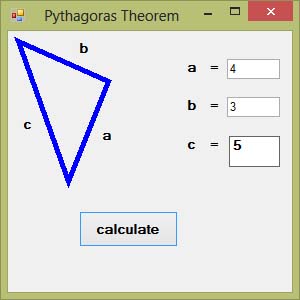
Figure 11.2: Output of the Pythagoras theorem program
11.4 Example 11.3
BMI Calculator
Body Mass Index, or BMI, is a common measurement used to estimate whether a person is underweight, within a normal range, overweight, or obese.
Underweight = < 18.5
Normal weight = 18.5 - 24.9
Overweight = 25 - 29.9
Obesity = 30 or greater
BMI is calculated using the formula:
bmi = weight / (height ^ 2)where weight is measured in kilograms and height is measured in meters. The code is shown below:
Private Sub Button1_Click(ByVal sender As System.Object, ByVal e As System.EventArgs) Handles Button1.Click
    Dim height, weight, bmi As Single
    height = TextBox1.Text
    weight = TextBox2.Text
    bmi = weight / (height ^ 2)
    LblBMI.Text = bmi
End Sub
For example, if a person’s height is 1.80 meters and the weight is 75 kg, the BMI is about 23.15, which falls within the normal range.
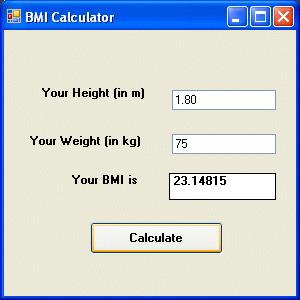
Figure 11.3: Output of the BMI calculator
11.5 More Practice Ideas
Other Arithmetic Projects You Can Build
Once you understand arithmetic operators, you can create many more useful programs. Here are some ideas:
Area of a triangle
Area of a rectangle
Area of a circle
Volume of a cylinder
Volume of a cone
Volume of a sphere
Compound interest
Future value
Mean
Variance
Sum of angles in polygons
Conversion of lb to kg
Conversion of Fahrenheit to Celsius
Conversion of mile to km
Conversion of meter to foot
11.6 Why This Matters
Why Arithmetic Programming Is Important
Arithmetic coding is one of the foundations of practical programming. Once you understand how to use arithmetic operators properly, you can build educational tools, business calculators, engineering formulas, health applications, and many other real-world programs.
Recommended Upgrade
Build on This Foundation
Continue to VB2026
After learning the basics of arithmetic operations in VB2015, move to the newest VB2026 tutorial for a more modern VB.NET learning path.

Visual Basic Programming
Use this Top Release book to reinforce your tutorial learning with a more structured guide.
Practice
Exercise Questions
- What is the difference between /, \, and Mod in Visual Basic 2015?
- Write a short program that calculates the area of a rectangle using two text boxes and one label.
- Why is the exponent operator ^ useful in programs like the Pythagoras theorem calculator and BMI calculator?