Creating Functions
A function is similar to a sub procedure, but with one key difference — it returns a value. Functions are essential for calculations, reusable logic, and building structured applications.
Lesson Overview
What is a Function?
A function is a reusable block of code that performs a task and returns a value. Unlike a sub procedure, which only executes actions, a function produces a result.
- Sub Procedure → performs task (no return value)
- Function → performs task + returns value
There are two types of functions:
- Built-in functions (e.g., Len, Format)
- User-defined functions (created by programmers)
Function Syntax
Public Function functionName(arg As DataType) As DataType
    Statements
End Function
Key points:
- Public → accessible throughout project
- Private → limited to module/form
- Arguments pass values into function
- Function must return a value
Example 17.1 – BMI Calculator
BMI = weight / height²
Private Function BMI(height As Single, weight As Single) As Double
    BMI = weight / height ^ 2
End Function
LblBMI.Text = BMI(h, w)This function calculates BMI and returns the value to be displayed.

Figure 17.1 – BMI Output
Example 17.2 – Future Value Calculator
Future Value Formula:
FV = PV * (1 + i / 100)^nPrivate Function FV(pv As Single, i As Single, n As Integer) As Double
FV = pv * (1 + i / 100) ^ n
End FunctionThis function calculates compound interest over time.

Figure 17.2 – Future Value Output
Passing Arguments: ByVal vs ByRef
Arguments can be passed in two ways:
- ByVal → original value unchanged
- ByRef → original value modified
Private Function sqroot(ByRef x As Single) As Double
    x = x ^ 0.5
    Return x
End Function
Private Function sqroot1(ByVal y As Single) As Double
y = y ^ 0.5
Return y
End FunctionImportant:
- ByRef modifies original variable
- ByVal keeps original safe
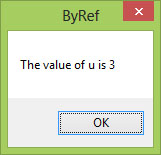
Figure 17.3 – ByRef modifies value
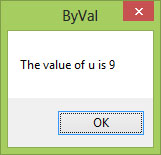
Figure 17.4 – ByVal preserves value
Recommended Upgrade
Build on This Foundation
Continue to VB2026
After learning sub procedures in VB2015, move to the newest VB2026 tutorial for a more modern VB.NET learning path.

Visual Basic Programming
Use this Top Release book to reinforce your tutorial learning with a more structured guide.
- Functions return values
- Reusable and cleaner than repeating code
- Can accept parameters
- ByRef vs ByVal affects data handling